One of the basic but critical tasks in any project is protecting the repository. Depending on the project, this can become quite complex, especially when CI/CD pipelines are involved.
Here I want to show a simple and effective approach that can significantly reduce risks and help prevent accidental or dangerous changes.
The core idea is straightforward: protect the main (or master) branch. Any changes to this branch should only be possible via pull requests.
From personal experience, I have more than once confused commands and accidentally committed directly to the main branch. Fortunately, I noticed it before pushing. However, you can easily imagine a scenario where someone uses --force — and that’s where serious problems begin.
Luckily, Bitbucket already provides built-in tools to prevent this. Similar mechanisms also exist in GitHub and other Git hosting platforms.
Below is a step-by-step guide on how to configure branch protection in Bitbucket.
How to protect the main branch in Bitbucket
- Open the required Project in Bitbucket.
- Go to Repository settings.
- In the left sidebar, navigate to Workflow → Branch restrictions.
- Click Add a branch restriction.
Configure the restriction with the following settings:
- Branch:
main - Write access: Only specific people or groups
- Leave empty (no direct write access)
- Disable:
- Rewriting branch history
- Deleting this branch
- Merge access via pull requests: Everyone with access to the repository
- Click Save.
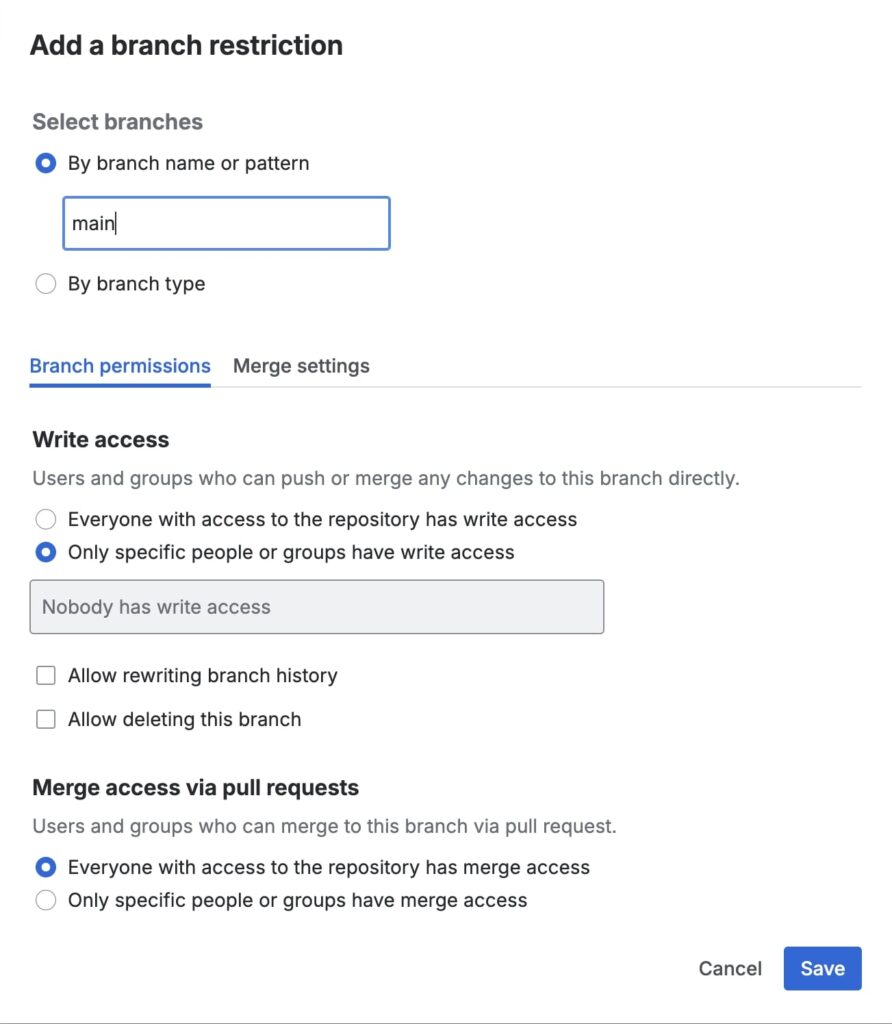
That’s it. With just a few simple steps, your main branch is now protected from direct changes.
Make this configuration a standard part of your project setup. It improves repository security, reduces human error, and makes your CI/CD workflow much safer.